


Prepear Meal Planner & Recipes
3.8324.00 Reviews
App Specs
- Version
- 26.4.11
- Updated On
- License
- Free
- Downloads
- 100,000+
- Developer
- Prepear
- Categories
- Food & Drink
- Platform
- Android
Screenshots
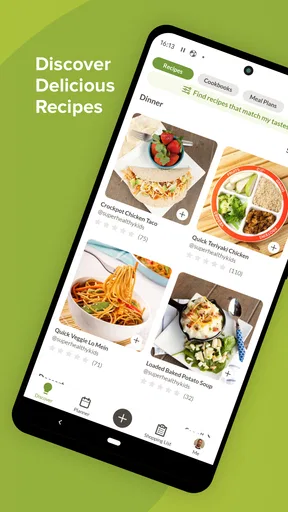
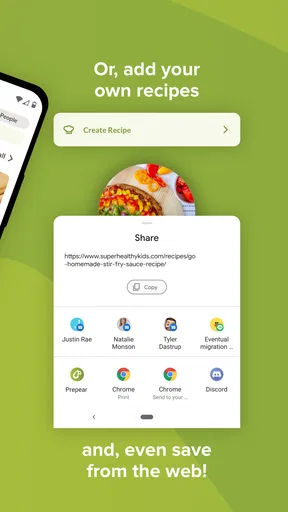
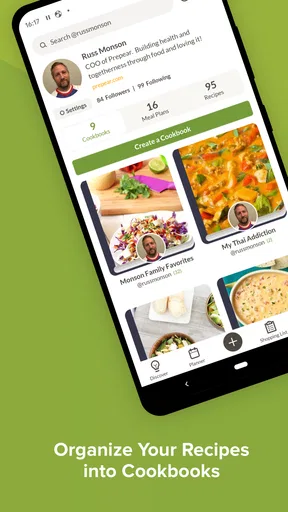
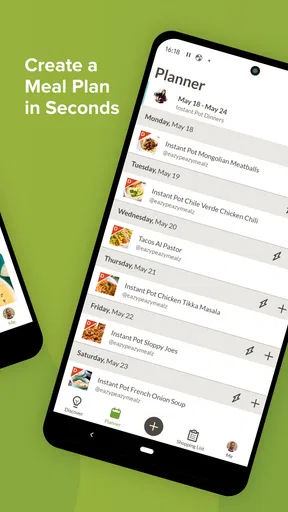

 Analysis by AppCompare
I tend to judge meal-planning apps by what happens on a busy weekday, not by how attractive the recipe screen looks. I want to know whether the app helps me decide what to cook, turns that decision into a useful shopping list, and stays out of my way when my plans change. Prepear Meal Planner & Recipes is built around that complete food-planning loop, combining recipes, meal scheduling, grocery planning, and cooking guidance in one place.
After spending time with it, I see the appeal clearly: it is less about finding one impressive recipe and more about reducing the small decisions that pile up before dinner. The app is free to start, comes from Prepear, and sits in the Food & Drink category. Its store listing shows a 3.8 average from roughly 1.1 thousand ratings, with more than 100 thousand installs, so it has attracted a meaningful audience without feeling like an enormous, anonymous platform.
My overall view is positive but measured. This is a useful choice if you want a connected planning system rather than a loose collection of recipes. It is less convincing if you already have a grocery-list app you love, prefer cooking entirely from your own recipes, or dislike the idea of organizing meals inside a dedicated service. The strongest experience comes when I use several parts together instead of treating it as a recipe browser.
How Prepear earns trust during ordinary meal planning
I judge a meal-planning routine by whether it remains useful when the week gets messy, not just when I have time to organize it. In this section, I look at the small checks that help me keep plans practical: reviewing what is already at home, leaving space for changes, and being deliberate about what I save. Those habits make it easier to decide which parts of the app deserve a regular place in my routine.
A practical role for the developer and the app itself
Prepear is developed by Prepear, and the product has been available since October 18, 2017. That history matters to me in a modest way: I am more comfortable testing an established meal-planning concept than downloading an app that appears overnight and immediately asks me to rebuild my entire routine around it. The current version is 26.4.11, and the minimum operating-system requirement is Android 9, which makes it accessible to many still-used phones while keeping the experience tied to a reasonably modern platform.
I do not treat age or download figures as proof that an app is perfect. They simply provide context. Trust here comes more from whether the workflow is understandable and whether I can tell what I am doing at each step. Prepear generally makes sense as a sequence: choose food, arrange it into a plan, prepare a shopping list, and cook. That sequence is easier to evaluate than a service that mixes recipes, social content, promotions, and unrelated features without a clear center.
The store’s short description is simply “Prepear,” while its longer summary presents meal planning, grocery lists, recipes, and cooking as the main purpose. In practice, that combination is important because each part solves a different kind of friction. Recipes help with inspiration, the plan gives those recipes a place in the week, and the list turns intention into an errand. Removing any one of those links makes the rest less useful.
Worth Reading Before You Choose

Flipboard Shows What News Apps Must Do Beyond the Feed

Switching to Android Auto Means Rethinking Your Driving Routine

Google Calendar Makes a Crowded Week Easier to Manage

Ludo King Makes the Most of the Minutes Between Plans

Baby Panda World Brings Quick Play to Modern Phones, but Its Game Library Feels Busy

ESPN’s Live Game View Makes Following Close Games Easier
What I check before trusting a food app
Food apps can become surprisingly personal. A recipe service may reveal dietary preferences, household routines, shopping habits, or the kinds of meals someone prepares for family members. I therefore look for visible choices rather than assuming that a polished interface automatically means careful handling of information. With Prepear, I would review the account, privacy, and permission screens directly on the device before committing to a long-term routine, especially if I plan to save a large personal recipe collection or use the app as my main weekly organizer.
That is not a criticism of the app; it is a sensible habit for any service that stores personal planning details. The useful distinction is between information I deliberately enter and access the phone may request for other functions. I prefer to grant only what is needed for a feature I am actively using, and I expect to be able to revisit those choices in the phone’s settings. If an app asks for access at an inconvenient moment, I pause rather than accepting automatically.
Prepear’s free entry point also makes it easier to test the workflow before deciding whether it deserves a permanent place in my routine. The app includes in-app purchases ranging from $0.99 to $119.99 per item, so I would not assume that every part of the experience is included simply because downloading costs nothing. I would inspect any upgrade screen carefully, check what a purchase unlocks, and avoid treating a large price range as a reason to buy immediately.
Where the connected workflow is genuinely useful
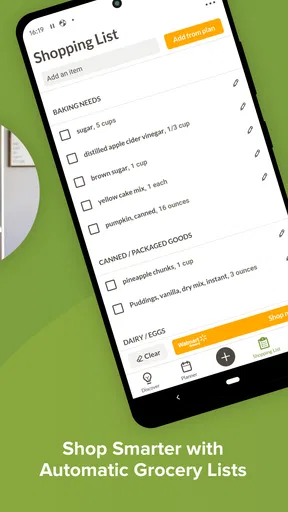
The most valuable idea is the connection between a meal plan and a grocery list. In a basic recipe app, I might bookmark five dinners and still have to remember which ingredients I need, how much of each item to buy, and which meals I intended to make first. Prepear is designed to bring those steps closer together. That does not remove the need to check quantities or pantry supplies, but it can reduce the mental translation from “I want to cook this” to “I know what to purchase.”
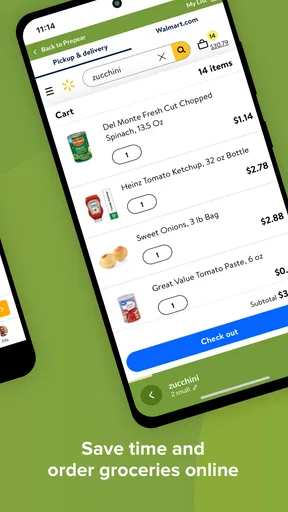
A realistic example is a Sunday evening when I have three workdays ahead and little interest in making decisions after getting home. I can choose a few meals, place them across the week, and turn the plan into a shopping task while I still have the energy to think clearly. At the store, the list becomes the practical output of that earlier planning. On a busy night, I am not searching through saved recipes hoping to remember what I intended to use; I already have a planned destination.
The trade-off is that planning creates a commitment. If my schedule changes, a carefully arranged week can become a source of guilt instead of help. I get better results when I plan fewer meals than I think I will cook and leave room for leftovers, takeout, or an unplanned change. The app can organize my intentions, but it cannot predict traffic, overtime, illness, or the fact that I may simply not want the meal I selected several days earlier.
Small decisions that make the system work better
One useful habit is to treat the grocery list as a draft rather than a final authority. Before shopping, I would check what is already in the cupboard, freezer, and refrigerator, then remove duplicate items mentally or from the list. This matters because a planner can know what recipes require without knowing what I bought yesterday. The app is strongest at organizing selected meals; I remain responsible for adapting the list to my real kitchen.
I also prefer planning by ingredient overlap instead of choosing unrelated recipes. For example, if several meals use the same type of vegetable, herb, or staple, the list becomes easier to manage and leftover ingredients are less likely to sit unused. This is a more advanced use of the planner than simply filling every day with a different recipe. It turns the app into a tool for reducing waste and shopping effort, not just a source of cooking ideas.
Another practical approach is to separate “recipes I want to try” from “recipes I can realistically cook this week.” Inspiration and scheduling are not the same thing. A complicated dish may be appealing when I have time on the weekend but unsuitable for a late weekday evening. Keeping that distinction in mind prevents the meal calendar from becoming an unrealistic wish list.
Cooking guidance versus the freedom of ordinary recipe search
I find a dedicated planner more helpful than a standard search engine when I already know I need structure. Search is faster for a single question such as how to use one ingredient, but it leaves me to manage the surrounding decisions. Prepear’s value is cumulative: a recipe is not isolated from the rest of the week, and the shopping step is part of the same general task.
On the other hand, people who enjoy improvising may find this approach more organized than necessary. If I usually open a browser, choose whatever looks good, and cook without planning, a combined meal system may feel like extra administration. The same is true for someone who already has a trusted notes app, a shared family list, and a favorite recipe collection. In that situation, Prepear must save enough time to justify moving those habits into a new workflow.
I would also be cautious about assuming that a recipe plan automatically accounts for every household need. Allergies, medical diets, religious restrictions, picky eaters, and different portion requirements all demand personal checking. I would read ingredients and instructions myself, confirm substitutions, and avoid treating a convenient recipe recommendation as professional dietary advice. That is especially important when more than one person is eating from the same plan.
Visible choices, purchases, and account control
Because the app is free to download but offers purchases, I would make the subscription or purchase boundary part of my first test. I want to know which planning actions remain available without payment, what a paid option changes, and whether the purchase is a one-time item or part of a continuing commitment. The exact wording on the purchase screen matters more than a general promise that the app is free.
I would also test the account experience before investing hours in it. Can I find the settings without searching through unrelated screens? Are sign-in and account options easy to recognize? Can I review the choices I made when first opening the app? These are not glamorous features, but they determine whether I feel in control. A meal planner should make it easy to plan dinner, and it should also make it easy to understand the relationship between my account, my saved content, and my device.
For privacy-sensitive use, I would avoid entering information that is not necessary for the planning task. A general preference such as avoiding an ingredient may be useful to my own workflow, but I would think twice before recording detailed health information unless I had a clear reason and had reviewed the relevant settings. This is a simple form of user agency: I decide how much personal context the app receives instead of supplying everything by default.
Who will benefit most from Prepear
I would recommend it first to people who repeatedly reach the end of the day without knowing what to cook. It is also a good fit for someone who wants to plan several meals before shopping, a household trying to coordinate food decisions, or a beginner who needs more structure than a random recipe feed provides. The combined workflow is particularly useful when shopping and cooking feel like separate chores that keep interrupting one another.
It can also help a person who wants to reduce impulse purchases. Planning a group of meals before entering the store gives the shopping trip a purpose, even if the final list still needs editing. The benefit is not that every week becomes perfectly efficient; it is that fewer decisions are made under time pressure. I find that distinction important because realistic planning is more sustainable than trying to optimize every ingredient.
I would skip it, or at least test it cautiously, if I mainly need a fast ingredient lookup, a specialized nutrition calculator, or a simple shared checklist. A grocery-list app may be better for a household that already knows its meals. A recipe website may be better for someone who wants the widest possible search experience. A notes app may be better for a cook who creates personal recipes and does not want a structured catalog. Prepear makes the most sense when the planning connection is the problem I am trying to solve.
My cautious verdict after using the complete idea
Prepear Meal Planner & Recipes is a thoughtful option for turning meal decisions into a repeatable routine. I like that its purpose is concrete: choose meals, organize them, prepare to shop, and cook with less last-minute scrambling. The app’s usefulness grows when I plan realistically, check the generated list against my kitchen, and use ingredient overlap to make the week easier rather than filling every slot simply because the calendar allows it.
My reservations are equally practical. A planner can feel like work if I do not actually want to plan, and the free download should not be confused with unlimited access to every possible option because in-app purchases are present. I would also keep privacy and account choices in view, especially before storing detailed household or dietary information. Those checks do not make the app difficult to use; they help me decide what role it deserves in my routine.
My recommendation is to try Prepear as a planning experiment, not as a promise to reorganize your entire kitchen. Build a small plan, inspect the shopping result, cook from it once or twice, and see whether it saves more effort than it adds. If the answer is yes, the app can become a dependable bridge between recipe inspiration and an actual dinner. If I only want recipes or a bare grocery checklist, I would choose a simpler alternative instead.
Pros
- Helps organize weekly meals and reduce last-minute cooking decisions.
- Grocery lists make it easier to shop with a clear plan.
- Recipe saving keeps favorite meal ideas in one convenient place.
- Useful for tracking ingredients already needed across several recipes.
- Supports healthier routines by encouraging planned
- home-cooked meals.
Cons
- Many advanced planning features may require a paid subscription.
- The recipe catalog may not match every dietary preference or cuisine.
- Entering personal recipes can take time
- especially for larger collections.
- Some meal suggestions may require ingredients that are costly or hard to find.
- The app may feel overwhelming for users who prefer spontaneous meal choices.
FAQs for Prepear Meal Planner & Recipes
What is Prepear Meal Planner & Recipes, and what can I do with it?
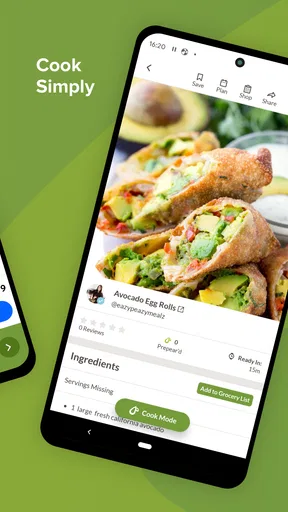
Prepear is a meal-planning and recipe-management app designed to help organize what you eat throughout the week. After exploring the app, users can browse recipes, save favorites, build meal plans, and create shopping lists from selected dishes. It is useful for people who want to reduce daily decision-making, plan ingredients in advance, and keep cooking ideas organized in one place.
Does Prepear include recipes for different diets and eating preferences?
Prepear offers a broad selection of recipes and allows users to search for meals according to different needs, ingredients, and preferences. Depending on the recipe collection and available filters, you may find options suitable for vegetarian, healthy, family-friendly, low-carbohydrate, or other eating styles. However, users with allergies or strict medical diets should always check every ingredient and preparation detail themselves.
How does the meal-planning and grocery-list feature work?
The meal planner lets you arrange recipes across specific days and meals, making it easier to see what you intend to cook during the week. Once meals are selected, ingredients can be combined into a shopping list, which helps avoid repeatedly writing items down. You should still review quantities, pantry items, substitutions, and serving sizes before shopping, since recipes may require personal adjustments.
Is Prepear free to use, or does it require a subscription?
Prepear can be downloaded and used with free features, but some content or advanced tools may be available only through optional in-app purchases or a subscription, depending on the current version and region. Before committing, review the pricing page shown in the app store and the subscription terms. Pay particular attention to trial periods, renewal dates, and cancellation instructions.
Is Prepear suitable for families and beginners in the kitchen?
Prepear is generally approachable for beginners because recipes are presented with ingredient lists and step-by-step cooking instructions, while the planner helps families coordinate meals ahead of time. It can also make grocery preparation more convenient when several people share responsibility for cooking. Nevertheless, recipe difficulty, serving sizes, and preparation time vary, so check those details before choosing meals for a busy household.


